


Karma is an easy to use WYSIWYG page builder that enables users to quickly create engaging Confluence pages.
Prerequisite
Section titled “Prerequisite”- You must have Karma installed in your Confluence instance.
- Find the channel ID for the announcement page and note it down.
1. Add the Karma macro to a Confluence Page
Section titled “1. Add the Karma macro to a Confluence Page”- You can find detailed instructions on how to use Karma in the Karma documentation.
2. Add an Embed section to the page
Section titled “2. Add an Embed section to the page”- Find the “Embed” section in the left sidebar and select “Hub” from the available embed options.
- Drag the embed onto the page.
3. Add the channel ID in the embed settings
Section titled “3. Add the channel ID in the embed settings”- Enter the Channel ID into the “Embed” text field of the embed settings - your release notes should render in the background if done correctly.
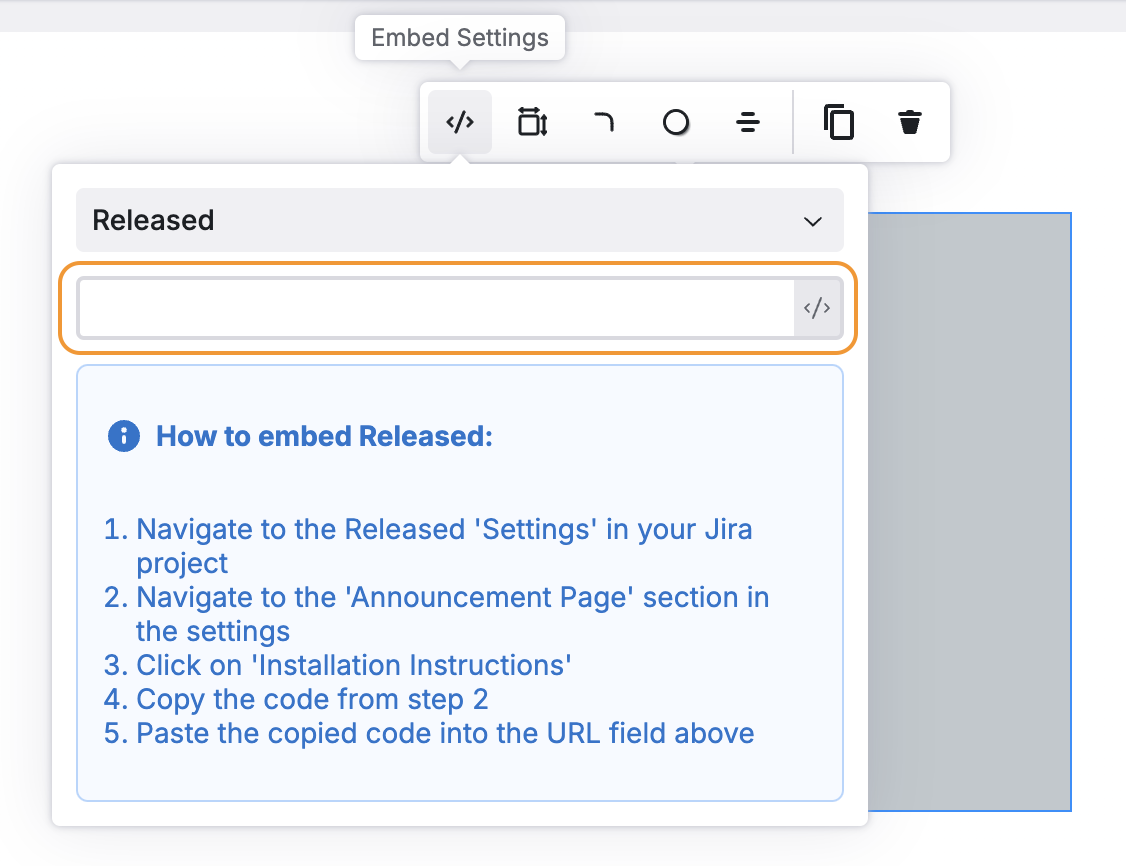
4. Publish the page
Section titled “4. Publish the page”- Click “Publish” in the top-right to publish the Confluence page.
Congratulations, you’re done 🎉
New posts published to the Announcement Page channel in Hub will now automatically appear in Confluence.